Turn on-screen English into your language, in place
Game Overlay Translator reads the text on your game screen and overlays the translation right on top of the original — no window switching. It works fully offline, with unlimited translations and no subscription.
Getting started — ready in 30 seconds
- Launch from Steam. The first-run wizard asks just two things: the game's language and yours.
- Press Full (F9) to translate everything on screen — or drag a frame around the subtitles with Select and switch on Auto.
- Done. Text is recognized, translated and drawn right over the original, and Auto mode keeps up as it changes.
Everything else — hotkeys, fixing a translation with the glossary, choosing an engine — is explained in the built-in Help (Settings → ❓, in all 22 interface languages).
Feels slow? Open Settings → About to see whether you are running on GPU or CPU. Translating a selected region instead of the full screen, switching OCR quality to "Speed", or using the subtitle style (solid box, up to 18x faster rendering) all help.
Want even better quality? Keep OCR on "Accuracy" (the default), register your own terms in the glossary, or connect a local AI — Ollama or LM Studio — with your own custom prompt. Everything runs on your PC.
What it does NOT do (please read before buying)
- It translates on-screen TEXT only. Voice and audio are not translated — for movies, use it with subtitles turned on.
- Windows PC only. Not supported: Steam Deck, macOS, Linux/Proton, VR headsets.
- Stylized or pixel-art fonts (retro games, old-console emulators) are hard for the OCR to read and may translate poorly.
- Some games block screen capture (exclusive fullscreen, some anti-cheat). Switching the game to borderless windowed mode usually fixes this.
- It translates text where it appears, at that moment — it does not track and follow moving in-world text such as character nameplates or damage numbers.
Tip: press F5 and select just the subtitle or dialogue area — the tool will leave the rest of your screen untouched.
Best results come from still text: chat logs, quest descriptions, item and skill tooltips, dialogue and menus. In MMOs and other games where the whole screen is always moving, press F5 and select just the chat or quest window — translations will be faster and stay exactly where they belong.
Great for
- Playing games with no localization — understand menus, quests and item text as you go
- Reading story and dialogue — translate NPC lines on the spot
- Translating just one area — drag to select a region; only that box is translated
- Doujin, indie and older PC games — comfortable even without an official translation
Features
- Full-screen translate (one hotkey) and region translate (movable box)
- Fully offline (recommended) — no internet, unlimited, high-quality local model
- Optional local LLM (Ollama) for more context-aware results
- In-place overlay — original text blended out, translation drawn in the same spot
- Glossary to fix game-specific terms to the wording you want
- Display customization — font size, color, background opacity, selection-box color
- Translate into 35 languages — 19 European languages added. Major languages are bundled and fully offline; some European languages download once automatically on first use (offline afterwards)
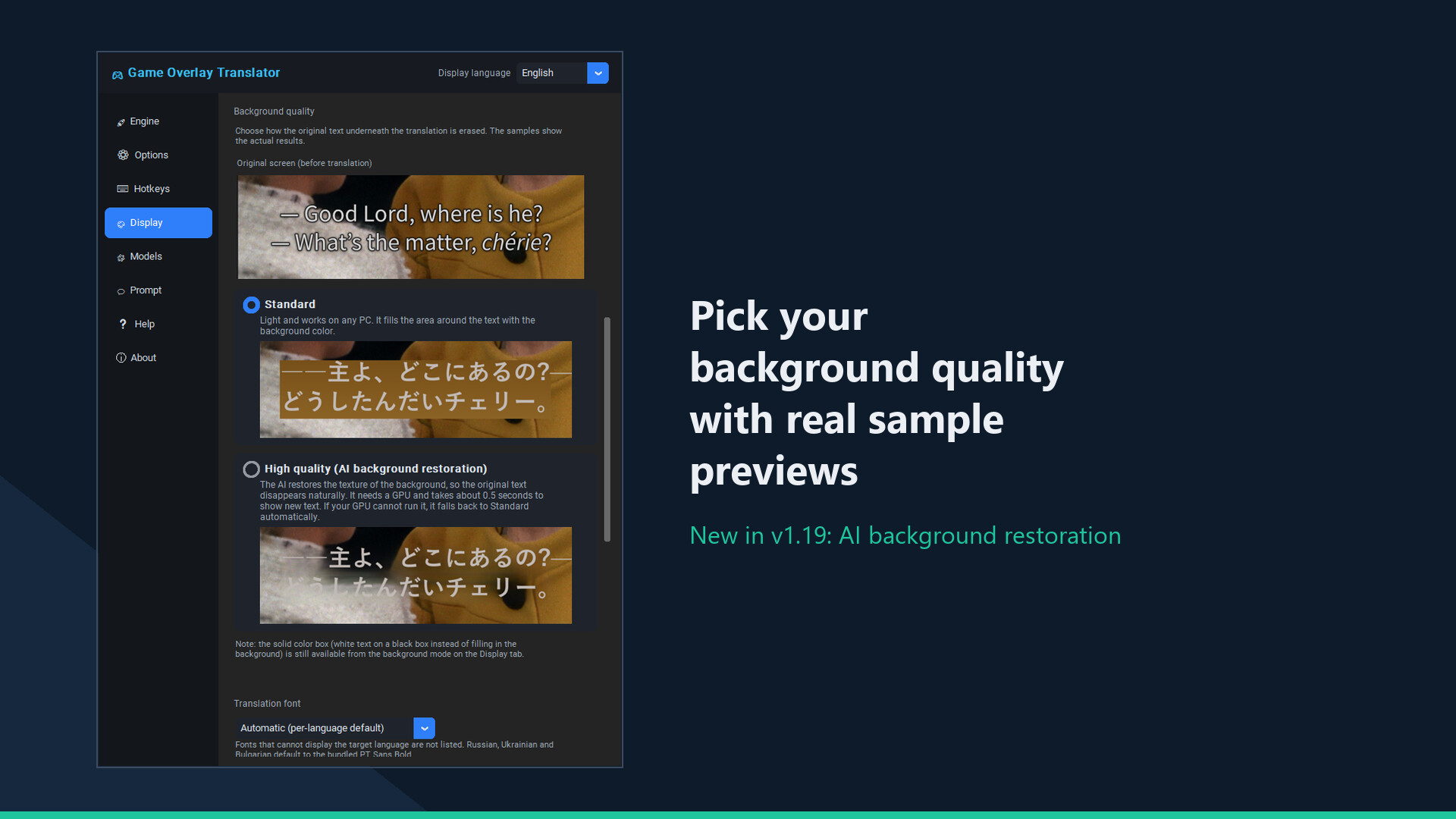
- High quality (AI background restoration) — the AI restores the texture of the background so the original text disappears naturally instead of being covered by a flat color box (v1.19). Works especially well on movie and live-action subtitles. Note: it uses your GPU (DirectML), so we don't recommend it while playing GPU-heavy games. The default stays the lightweight "Standard", and it falls back to Standard automatically if your GPU can't run it.
- NEW in v1.17: Indonesian and Malay — both as target and source languages (small one-time download each).
- Multilingual UI (22 languages)
A floating control bar
While translating, a small on-screen bar gives one-click access to full-screen / region translate, auto mode, history and settings.
How it works
Screen capture, OCR, translation, then in-place overlay. Results are cached locally for instant re-display.
Important notes
- As an on-screen overlay, games with anti-cheat (EasyAntiCheat / BattlEye / VAC, etc.) may warn, kick, or penalize your account. Use with online/competitive games at your own risk and check each game's ToS.
- May not appear in exclusive-fullscreen games — use borderless/windowed mode.
- Machine translation may not always be accurate.
Constantly improving — 12 updates in the first two weeks
- New-generation OCR: far more accurate recognition (Cyrillic errors down to zero in our benchmark, no more words glued together)
- Subtitle style for movies and videos: solid background box with adjustable color and opacity
- 19 bundled open-source fonts including a Japanese pack — pick the overlay font per game, or try experimental auto-matching
- Local AI translation via Ollama or LM Studio with your own custom prompt — everything stays on your PC
- Up to 62% faster full-screen translation, a hideable control bar, and much more
Every item above came from player reviews and reports. Post yours — it may well become the next update.
About translation quality (honestly)
The default engine is offline machine translation: fast, free and good enough for menus and quest text, but not literary. The screenshots show real, unedited output. If you want more natural, context-aware translations, the free Ollama integration runs a local LLM. And any translation you dislike can be pinned to your own wording with the glossary feature.