Create Any Crosshair
Crosshair EDGE is a powerful and highly customizable crosshair overlay for Windows games, built for players who want complete control over their aiming point.
Create anything from a clean competitive dot to a detailed multi-layer design. Use built-in vector shapes, import PNG images and animated GIFs, draw pixel-perfect crosshairs, or combine different content types into one unique setup.
Add a configurable bullet counter, automatically switch presets by game, create custom right-click actions, share designs through Steam Workshop, sync your setup with Steam Cloud, and organize your desktop with built-in edge panels.
Simple while playing. Powerful while editing. Flexible enough to create almost any crosshair you can imagine.
Custom Images, Animated GIFs & Pixel Drawing
Crosshair EDGE goes beyond traditional built-in shapes.
Import Your Own Crosshair
Import a PNG image or animated GIF and use it directly as part of your crosshair.
Import PNG and animated GIF files
Automatic cropping and optimization for imported PNG images and animated GIFs
Adjust scale, rotation, and opacity
Move imported elements independently
Save different images for every preset
Combine imported content with built-in shapes and other elements
Draw Pixel-Perfect Crosshairs
Use the built-in pixel drawing editor to create precise crosshairs one pixel at a time.
Pixel-level drawing and erasing
Zoom and canvas panning
Undo and Redo
Clear and Apply controls
Independent drawing colors
Scale, opacity, and position controls
Separate drawings saved for every preset
Pixel drawing is ideal for creating extremely sharp competitive crosshairs with exact spacing, precise center alignment, and clean lines suitable for serious or esports-style gameplay.
Mix and Match Everything
Different crosshair types do not have to be used separately.
Combine:
Place a hand-drawn center point inside a vector ring, add imported image details, use animated elements, and combine everything with additional shapes and outlines.
Every component can be customized and positioned independently, giving you far more freedom than a basic static crosshair overlay.
Advanced Crosshair Customization
Build your crosshair exactly the way you want.
5 built-in shapes: Plus, Ring, Square, Triangle, and Dot
9 independent layers that can be stacked together
20 preset slots for different games, weapons, or playstyles
Full color control for crosshair and outline
Individual segment toggles
Rounded or flat segment styles
Per-layer position offsets
Global scale control
PNG and animated GIF support
Built-in pixel drawing editor
Mixed crosshair designs
Each layer can have its own shape, size, color, opacity, outline, blur, rotation, and position.
Use a single dot, combine multiple vector shapes, add imported images, or build a detailed mixed crosshair from several different content types.
Bullet Counter
Add a customizable ammo-style counter directly to your crosshair overlay.
Choose between three display modes:
Numeric — display the bullet count as digits
Circular — show bullets as ticks around the crosshair
Linear — show bullets as a configurable row of ticks
Customize:
Magazine size
Shot delay
Reload delay
Reload key
Colors
Thickness
Opacity
Scale
Position
Visual style
Bullet Counter settings are saved separately for every preset, allowing different crosshair setups to use different counter modes, magazine sizes, reload keys, colors, and positions.
Automatic Game Detection
Create separate crosshair setups for different games and let Crosshair EDGE switch between them automatically.
Bind a preset to a game executable. When the game is detected, Crosshair EDGE switches to the matching preset. When the game closes, it can return to your previous setup.
Detect linked games automatically
Switch presets when a game launches
Return to the previous preset when the game closes
Use different crosshairs and Bullet Counter settings for each game
Keep separate setups for different weapons and playstyles
Custom Right-Click Actions
Configure how each preset behaves while the right mouse button is held.
Temporarily hide the crosshair
Switch to another preset
Return to the original preset after releasing right click
Configure different behavior for every preset
Useful for aiming down sights, using scopes, changing weapons, or temporarily replacing your main crosshair.
Steam Workshop
Browse, download, organize, rate, and upload crosshair presets directly through the app.
Discover Community Crosshairs
Sort Workshop content by:
Popular
Top Rated
Top Subscribed
Recent
Subscribed
Favorited
My Items
Search for presets by title and mark your favorite designs with a star for faster access later.
Filter by Content Type
All
Shape
Image
Animated
Drawing
Mix
Competitive
The Mix category contains presets that combine multiple content types.
The Competitive category helps players discover clean and precise designs intended for serious gameplay.
Share Your Creations
Upload vector crosshairs
Share PNG-based designs
Upload animated GIF crosshairs
Share pixel drawings
Publish mixed designs
Add preview images, titles, descriptions, and tags
Subscribe, favorite, and vote on community creations
Top Creators Leaderboard
Discover the most popular creators in the Crosshair EDGE community.
Creators are ranked by total subscribers across their Workshop uploads.
Filter rankings by:
All Time
This Month
This Week
Today
Select a creator to browse their crosshair designs directly inside the app.
Built-In Desktop Organizer
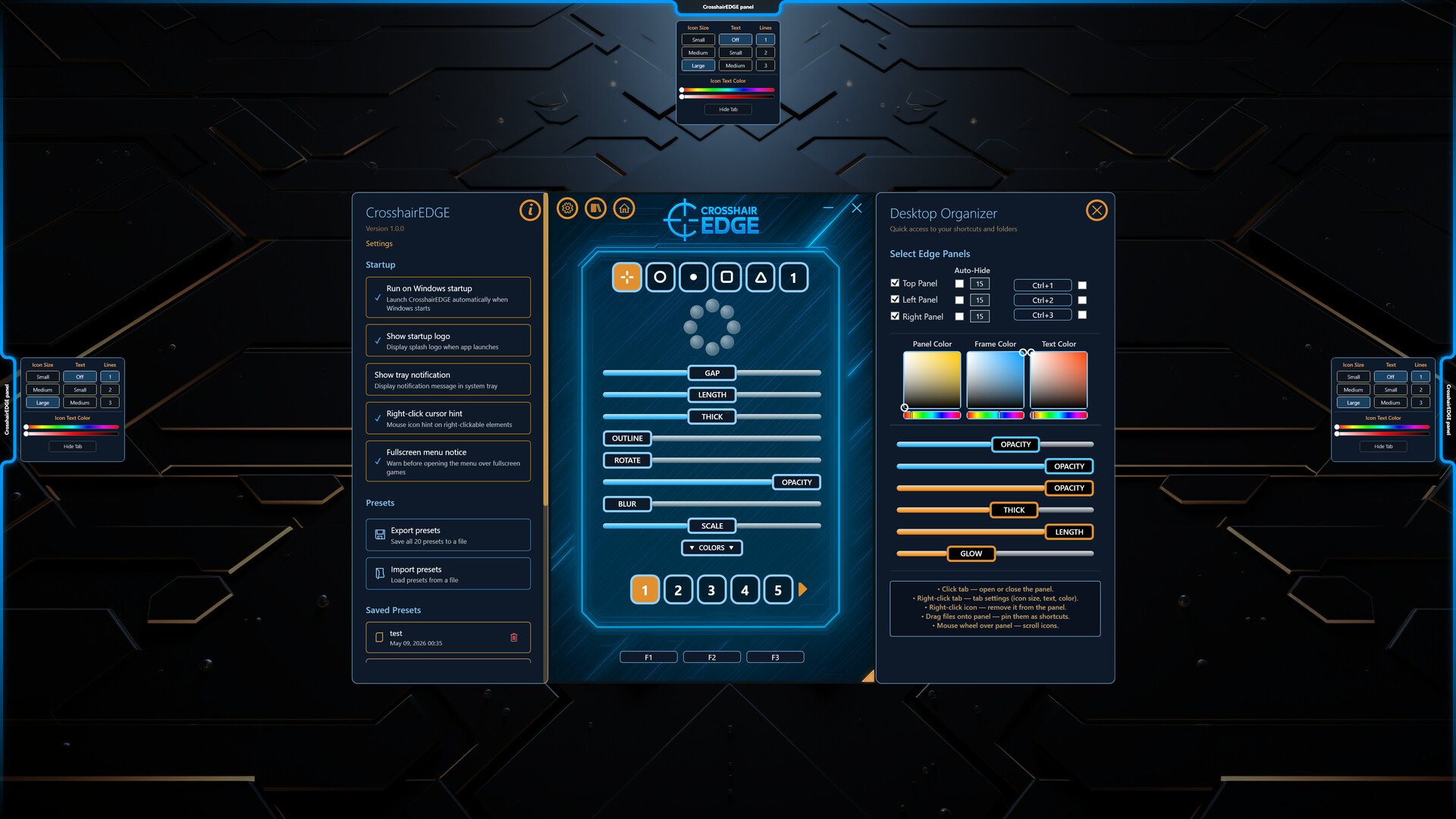
Crosshair EDGE also includes a Desktop Organizer with slide-out panels on the edges of your screen.
Pin frequently used files, folders, shortcuts, games, launchers, and tools to hidden panels.
Top, left, and right edge panels
Drag-and-drop support
Pin files, folders, and shortcuts
Reorder items freely
Customize icon size and text
Adjust colors, opacity, and panel appearance
Optional desktop cleanup support
Quick keyboard shortcuts
A practical bonus tool for keeping your desktop clean while keeping important items close.
Steam Cloud Sync
Take your setup with you.
Sync presets across computers
Sync hotkeys and configuration
Automatic background synchronization
Seamless multi-device experience
Launch Crosshair EDGE on another computer and your configurations are ready to use.
Smooth Overlay Workflow
Crosshair EDGE is designed to stay out of your way while you play.
Open the menu, make your changes, hide it, and continue playing.
High Performance
Crosshair EDGE runs with High process priority to help maintain smooth overlay rendering during demanding games.
Hardware-accelerated rendering and Windows DWM compositing provide a responsive, low-latency editing and overlay experience.
For the best compatibility, use games in Borderless Fullscreen or Windowed Fullscreen mode.
Safe Overlay-Only Design
Crosshair EDGE is designed as a visual screen overlay.
Does not inject code into games
Does not modify game files
Does not read or write game memory
Does not attach to game processes
Uses its own transparent overlay window
The overlay is click-through while playing and does not interfere with normal mouse or keyboard input.
Why Crosshair EDGE?
Crosshair EDGE combines:
Built-in vector shapes
PNG and animated GIF imports
Pixel-perfect drawing
Mixed and layered crosshair designs
Live Bullet Counter
Automatic game-based preset switching
Custom right-click actions
Steam Workshop sharing
Competitive content discovery
Top Creators leaderboard
Steam Cloud synchronization
Built-in Desktop Organizer
High-performance overlay rendering
Safe overlay-only design
Whether you want a minimal competitive dot, a sharp esports-style crosshair, an animated design, or a complex layered creation, Crosshair EDGE gives you the tools to create, save, share, and discover it.